Prospective customer
Provides contact details, project context, specifications, timing, budget range, and relevant files.
Product demo · Industrial sales workflow
A working demonstration of a technical request from customer intake through internal review: project-specific questions, file collection, ownership, status, and a printable summary.
Problem explored
The demo addresses a representative situation: an industrial team needs enough project context to decide what to review, who should own the request, and what information is still missing. It does not claim these problems came from a specific customer.
Representative users
Provides contact details, project context, specifications, timing, budget range, and relevant files.
Reviews the commercial context, completeness, priority, and next action.
Checks project-specific answers and technical attachments during initial scope review.
Keeps the request stage, owner, notes, and activity current for the team.
These are representative roles in the workflow, not people from a Soultware client organization.
Workflow
Choose a project type: automation, fabrication, equipment, or engineering.
Complete contact and project details, then answer the questions for that project type.
Attach drawings and references, review the submission, and send the request.
Open the same browser’s operations desk to see the request with the sample pipeline.
Search or filter the queue, then open the record to review its answers and files.
Update stage, priority, or assignee; add an internal note and follow the activity record.
Prepare a printable request summary for handoff. The demo does not calculate or issue a priced quote.
Product walkthrough
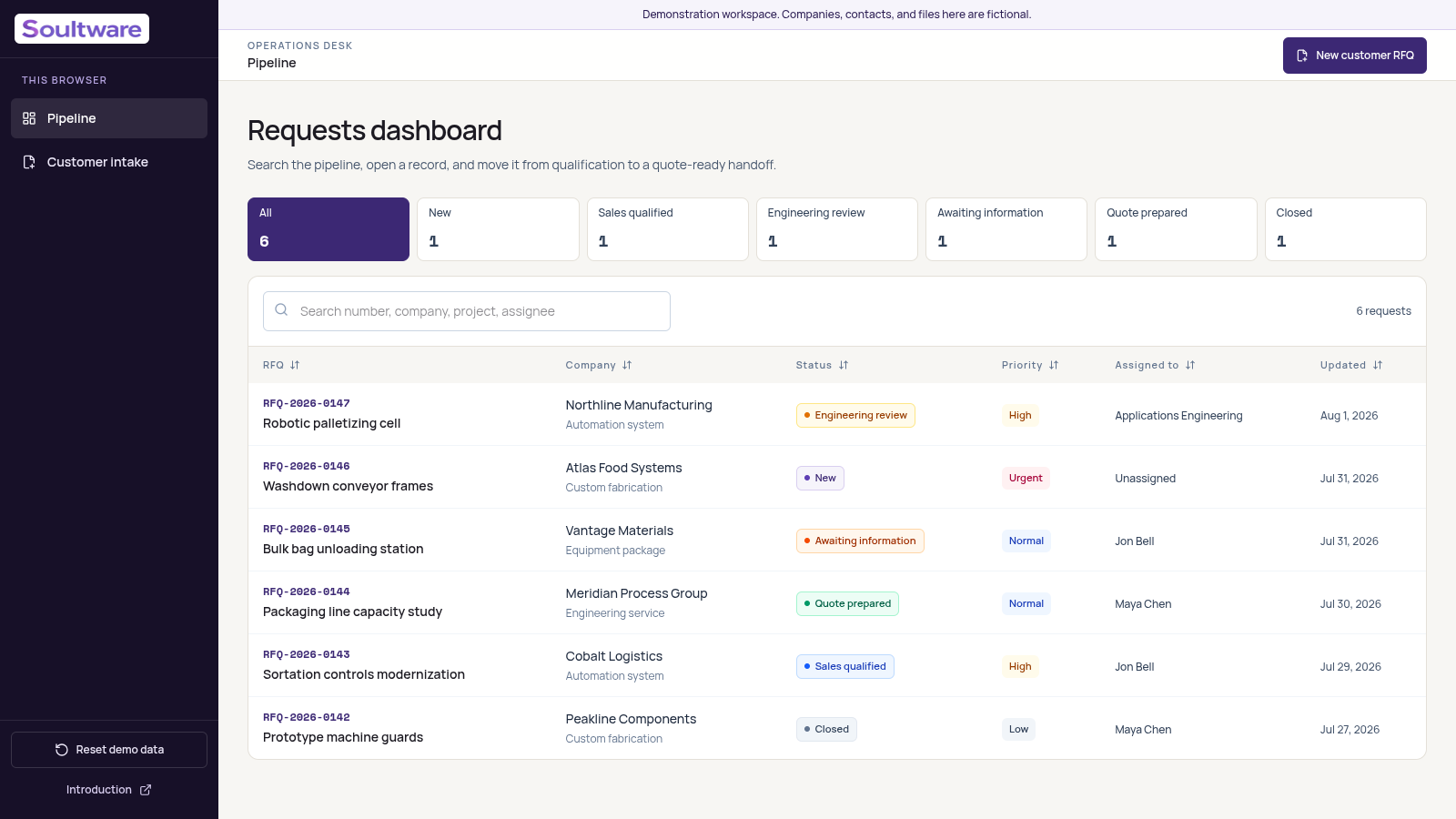
The current demo presents six fictional requests across six stages. Reviewers can search the queue, filter by stage, compare priority and assignee, and open a request to inspect its technical details.
A visitor provides contact and project details, answers questions for the chosen work type, attaches files, and reviews the request before submission. No sign-in is required for the demo.
The same browser can open the submitted request in its demo workspace. Search and stage filters help locate work, while each row shows company, status, priority, owner, and update date.
The record brings answers, attachments, internal notes, and activity together. A printable summary supports handoff; it is not a pricing engine or an issued quotation.
Received and waiting for qualification.
Commercial fit has been confirmed.
Scope, files, and constraints are being assessed.
The next step depends on details from the customer.
The request is ready for commercial release.
The request is complete or will not be quoted.
Architecture and implementation
The selected project type controls which technical questions appear. The server validates submitted values against a schema instead of relying on browser checks alone.
Answers, attachments, notes, assignment, priority, status, and update activity stay connected to the RFQ record.
The demo accepts up to five files, limits each file to 10 MB, checks an extension allowlist, and stores file objects separately from request data.
An HTTP-only cookie keeps a visitor’s demo workspace separate in that browser. Demo records are designed to expire after 48 hours.
The application is packaged for Cloudflare Workers, with D1 for relational records and R2 for uploaded file objects.
Customer submission, request updates, notes, and attachment retrieval use separate server routes with validation and workspace checks.
Engineering decisions
An automation cell, a fabrication order, an equipment package, and an engineering service need different technical context. The intake model keeps those questions tied to the chosen project type.
Reviewers can inspect the drawings and references from the same record as the request instead of reconstructing context from separate messages.
The six stages distinguish an unreviewed request from one awaiting customer information, under engineering review, ready for commercial release, or closed.
The printable view collects customer, project, status, files, and internal notes. A production quoting workflow would need its own pricing, approval, and release rules.
The demo isolates visitor workspaces, but has no production sign-in or role model. A real system would define who can see and change each organization’s records.
Demonstration outcome
A visitor can submit a structured request without signing in, then open it in the same browser’s isolated workspace. A reviewer can search and filter the queue, inspect answers and attachments, change qualification fields, add a note, follow activity, and prepare a printable summary.
The working flow makes intake fields, qualification states, ownership, and handoff concrete enough to discuss against a real process. It does not establish faster quoting, higher conversion, or any customer outcome; those would need to be measured in a production implementation.
Limitations
The demo has no production identity provider or role-based authorization, no real CRM or ERP connection, and no malware scanning or organization-specific compliance controls. Its cookie-based workspace isolation exists to keep visitor demo records separate.
Security, integrations, permissions, hosting, retention, backup, observability, support, and compliance requirements vary and must be scoped for each production implementation.
See the workflow first
In a 15-minute review, we can map where RFQ information enters your process, identify qualification gaps, and decide whether a custom system is worth exploring.
Back to Work